
Hole Busters 3D
DREAMPLAYPuzzle
4.7684.00 Reviews
- Version
- 1.6.3
- Installs
- 100.00K
- Age Rating
- Everyone
Screenshots
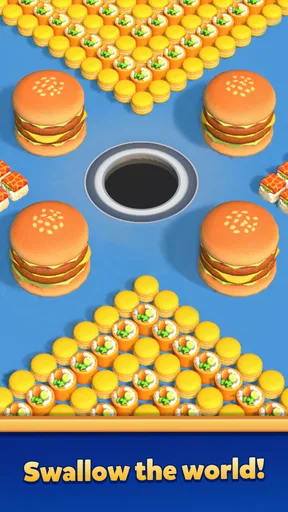







Our Review of Hole Busters 3D
 Analysis by Appyee
I went into Hole Busters 3D expecting a simple time-filler, and that is exactly where it works best. It is a free puzzle game from DREAMPLAY built around the familiar black-hole idea: guide the hole through a 3D space, collect what fits, and keep moving through compact challenges. The appeal is immediate because the controls are easy to understand, while the three-dimensional view gives each level more personality than a flat matching puzzle.
After spending time with it, I would describe it as a relaxing game first and a test of planning second. It does not demand the same concentration as a traditional logic puzzle, but it still rewards players who stop rushing and think about the order in which they approach objects. That balance makes it comfortable for short sessions, especially when I want something interactive without committing to a long story, competitive match, or complicated ruleset.
Hole Busters 3D is listed as a Puzzle game, carries an Everyone age rating, and can be installed free of charge. It has reached over 100 thousand installs and holds a 4.7 average from around 11 thousand ratings, which fits my impression of a game designed for broad, casual appeal. There are in-app purchases ranging from $0.99 to $104.99 per item, so I would still approach the free download with the usual care around optional spending.
How the basic play loop feels in everyday use
The baseline workflow is pleasantly uncomplicated. I start a level, look over the arrangement, move the hole across the play area, and try to absorb the available objects before the opportunity disappears. The first few moments are usually about orientation rather than skill: I need to understand the camera angle, see which objects are reachable, and avoid making a movement that leaves useful pieces stranded.
That short planning step matters more than it might seem. When I played too quickly, I often created unnecessary backtracking for myself. When I paused long enough to identify a sensible route, the same stage felt almost meditative. This is the main reason the game fits a quick break: the rules are light, but the movement gives my attention something concrete to do.
A realistic use case is a five-minute wait at a bus stop or a short pause between tasks. I can open the game, complete a small amount of progress, and put the phone away without needing to remember a complicated plot or coordinate with other players. It is also suitable for someone who wants a gentle puzzle experience rather than a punishing brainteaser. The Everyone rating reinforces that accessible tone, although younger players may still need guidance around optional purchases.
The 3D presentation is important to the experience. The objects are arranged in space rather than simply placed in a two-dimensional grid, so positioning and camera awareness affect how clearly I can read a situation. The result is more tactile than a standard tile puzzle, even though the underlying objective remains easy to grasp.
What I check before making a move
My most reliable habit is to scan the whole area before moving. I look for clusters, isolated pieces, and any path that appears likely to become awkward later. I do not try to calculate every move in advance; that would take away the relaxed quality. Instead, I identify the next useful group and keep one alternative route in mind in case the camera or object placement makes the first plan inconvenient.
Another useful habit is to avoid treating the largest visible object as the automatic priority. A big target can be tempting, but approaching it first may block access to smaller pieces or force a less efficient route. I have had better results when I consider accessibility rather than visual size. The best first move is often the one that opens space, not the one that looks most rewarding.
I also recommend using the edges of the play area as reference points. In a 3D scene, it is easy to lose track of where the hole is headed when several objects overlap visually. Anchoring my attention to a corner, boundary, or clearly separated group helps me judge movement more accurately. This is a small technique, but it makes the game feel less fiddly on a phone screen.
Settings and phone habits worth checking
Before settling into longer sessions, I would check the available in-game and device settings rather than assuming the default setup is ideal. The most important practical questions are whether the control response feels comfortable, whether sound is appropriate for the place I am playing, and whether visual effects make the scene easier or harder to read. I would not change settings just for the sake of it; I would adjust only what solves a real irritation.
For example, in a quiet waiting room I would lower or mute audio and rely on the visual feedback. At home, sound can make the game feel more satisfying, but it is not essential to understanding the basic loop. If movement feels overly sensitive, I would slow down my finger gestures and use shorter inputs before deciding that the controls are a problem. Often the issue is not the game itself but trying to steer with broad, hurried swipes.
Screen orientation and brightness are also worth considering during a longer session. A bright screen can make a relaxing game feel tiring, while low brightness may hide details in darker scenes. I found that a comfortable viewing angle helped me more than repeatedly changing my play style. These are ordinary phone adjustments, but they matter because the game depends on reading a 3D layout clearly.
The current version is 1.6.3, and the minimum requirement is Android 7.0. That makes it approachable for people using older Android phones, though the actual comfort of play will still depend on screen size, touch response, and general device performance. I would give the game a brief test on an older handset before assuming the experience will feel identical to a newer phone.
Repeatable patterns that make progress smoother
Once I stopped treating every level as a race, I noticed several repeatable patterns. The first is to clear the most open route before entering a crowded section. This reduces the chance of getting visually confused and lets me approach dense groups with more room to correct my direction.
The second is to use a two-pass plan. On the first pass, I collect what is easy to reach and learn how the layout behaves. On the second, I return to the pieces that require a more deliberate approach. This is more dependable than trying to solve the entire level from one fixed viewpoint, especially when objects overlap or the scene does not reveal everything at once.
A third pattern is to pause after a successful collection instead of immediately dragging onward. That brief reset gives me time to see what has changed and prevents momentum from carrying the hole into an unhelpful position. It sounds minor, but it is one of the clearest differences between my careless attempts and my more consistent ones.
I would also suggest using short, controlled movements near groups of objects. Long gestures are faster when the route is obvious, but they are less forgiving when several targets sit close together. Short inputs let me adjust the approach and preserve a better view of what remains. This is especially useful for players who find 3D touch controls less precise than conventional tap-based puzzles.
These habits do not turn the game into a demanding strategy title, and that is not their purpose. They simply make the relaxing loop feel more intentional. Experienced players can create a rhythm: scan, open space, collect the easy group, pause, then handle the crowded area. That rhythm is more satisfying than randomly sweeping across the screen.
Where the game is strong compared with familiar puzzle alternatives
Compared with a match-three game, this feels less dependent on spotting combinations quickly. There is no need for me to watch a constantly changing board or chase a chain reaction. Compared with a word puzzle, it asks for almost no language ability. Compared with a traditional Sudoku-style game, it is more physical and visual, with less emphasis on formal deduction.
That makes it a good choice for players who want a puzzle-shaped activity without heavy mental bookkeeping. It is also easier to share casually with a child or a friend because the objective can be understood by watching a few seconds of play. The 3D space gives it more movement than a static logic board, while the simple premise keeps the learning curve gentle.
The trade-off is depth. If I am looking for elaborate puzzles, a long-term competitive ladder, or a system that constantly introduces new strategic rules, I would choose a more traditional puzzle title. Hole Busters 3D is better at delivering a pleasant, repeatable interaction than at providing a complex intellectual challenge. Its strength is focus, not variety.
That distinction is important when deciding whether to install it. Someone who enjoys relaxing collection-style movement will probably understand the appeal quickly. Someone who needs every level to introduce a new mechanic may find the experience too familiar after the initial novelty fades. I would not recommend it as a replacement for a serious logic game; I would recommend it as a lighter companion to one.
Limits, friction, and the role of optional spending
The free entry point is convenient, but the presence of in-app purchases means I would not hand the phone to a child without checking the device’s purchase protections first. The listed item range extends from $0.99 to $104.99 per item, so the difference between a harmless optional purchase and an unexpectedly large bill can be significant. That is not a reason to reject the game, but it is a reason to treat the purchase layer deliberately.
I also noticed that the relaxed design can become repetitive if I play for too long in one sitting. The same core action is enjoyable in short bursts, but it does not necessarily provide enough variation for an entire evening. My solution is to use it as a break game rather than a main hobby: a few levels between other activities feels better than forcing a marathon session.
Players who dislike touch-based movement may need patience at first. The 3D view can make a simple route appear less clear than it would on a flat board, and a hurried swipe can send the hole away from the intended target. I would skip this game if I specifically want precise tap controls, deep narrative progression, or a highly competitive experience.
There is also a difference between relaxing and effortless. The game is approachable, but I still need to pay attention to positioning if I want clean progress. That is a positive for me because it prevents the experience from becoming completely passive. However, anyone searching for something they can play without looking at the screen will be better served by an audio-focused or idle-style alternative.
Who should install it and who should look elsewhere
I think the best audience is made up of casual puzzle players, people who enjoy 3D spatial interaction, and anyone who wants a free game for short, low-pressure sessions. It is particularly suitable when I want a clear goal without a long tutorial or a complicated menu of systems. The Everyone rating also makes it broadly approachable, provided purchase controls are handled sensibly.
I would be more cautious about recommending it to players who measure value by deep replayability. The core loop is polished around its central idea, but that same focus may feel narrow if I expect a large range of puzzle formats. Likewise, fans of competitive scoring, elaborate progression, or story-driven games should probably treat this as a side game rather than their next main download.
The developer, DREAMPLAY, has positioned the experience around immediate accessibility rather than technical complexity. That choice works when I want to open a game and understand it quickly. It works less well when I want extensive customization or a sense that every session will demand a completely different kind of thinking.
My verdict after building a practical routine
My preferred way to play is simple: I use short sessions, begin with a full visual scan, take open routes first, and slow my movements near crowded groups. I keep audio appropriate to the setting, adjust the phone display for comfort, and avoid treating the game like a race. Those small choices make the experience noticeably smoother without relying on imaginary shortcuts or unlisted features.
Hole Busters 3D succeeds because it makes a familiar black-hole concept feel tangible on a phone. The 3D layouts give the puzzle loop enough character to stand apart from a basic matching board, while the gentle pace makes it easy to return to. Its weaknesses are equally clear: the central action can become repetitive, touch movement may take some adjustment, and optional purchases deserve attention.
For me, the final decision is straightforward. I would install it when I want a free, accessible puzzle game for waiting rooms, short breaks, or relaxed evenings. I would choose something else for demanding logic, competitive play, or long-form variety. If that distinction matches what you want, this is a comfortable little game with more room for thoughtful movement than its simple premise first suggests.
It is available for Android, supports devices starting with Android 7.0, and remains free to download. With its Everyone rating, strong 4.7 average, and growing player base, it is easy to see why it attracts casual players. Just approach the purchase options carefully, play in short focused bursts, and let the spatial planning—not speed—carry the experience.
Verdict
Strengths of Hole Busters 3D
- Simple controls make it easy to start playing immediately.
- Short levels are convenient for quick gaming sessions.
- Colorful 3D visuals give the game a cheerful appearance.
- Progression provides a steady sense of accomplishment.
- Offline play is useful when you have no internet connection.
Limitations of Hole Busters 3D
- Gameplay can become repetitive after extended play.
- Some levels may feel too easy for experienced players.
- Ads may interrupt the experience between levels.
- The game offers limited variety in its core mechanics.
- Performance may vary on older or less powerful devices.
Similar Picks in This Category
View All
Block Blast!
HungryStudio4.8

Braindom: Brain Games Test
Lahana Game Studio4.6

AMAZE!
CrazyLabs LTD4.6

Sudoku - Classic Sudoku Puzzle
Oakever Games4.7

Art Puzzle - Puzzle Games
Easybrain4.8

Amaze GO!
Oakever Games4.9
Frequently Asked Questions
What is Hole Busters 3D and how is the gameplay?
Hole Busters 3D is a casual arcade game built around controlling a moving hole that swallows objects, clears obstacles, and helps you progress through compact 3D levels. The gameplay is easy to understand, with simple touch controls and short rounds. As stages become more challenging, timing, positioning, and choosing the right objects to collect become increasingly important.
Is Hole Busters 3D free to download and play?
Hole Busters 3D is generally available as a free download, allowing players to start playing without paying upfront. However, the game may include advertisements, optional in-app purchases, or other monetization features depending on the version and platform. Before downloading, check the official store listing for current pricing, supported purchases, and whether the game requires an internet connection.
Does Hole Busters 3D work offline?
Many of the basic levels in Hole Busters 3D can usually be played without a constant internet connection, which makes it suitable for short sessions while traveling or when mobile data is unavailable. Nevertheless, advertisements, rewards, updates, leaderboards, and certain online features may require connectivity. Availability can vary by device, region, and game version.
Is Hole Busters 3D suitable for children?
Hole Busters 3D uses colorful visuals, straightforward mechanics, and non-realistic arcade action, so it can be accessible to younger players. Parents should still review the age rating and privacy information before installation. Advertisements, optional purchases, and external links may be present, and younger children might need supervision to avoid accidental purchases or interacting with unsuitable promotional content.
What devices are required to play Hole Busters 3D smoothly?
The game is designed for modern Android and iOS smartphones and tablets, but performance can differ depending on the device’s processor, memory, operating-system version, and available storage. A newer mid-range device should generally provide smoother loading and controls. Before installing, confirm the latest compatibility requirements in the official Google Play or App Store listing.
Play our best games!


